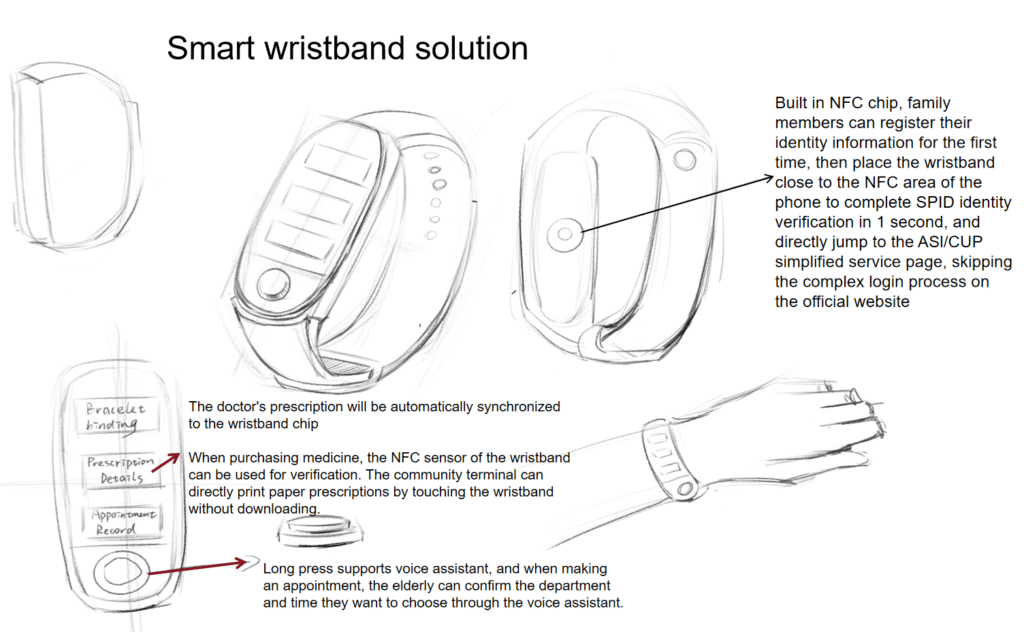
1、 Preparation: 1 setup, lifelong use
Completed by family members or community workers at post office/pharmacy service points:
- The staff will bind the wristband with the elderly person’s SPID identity and health card, and enter the emergency contact phone number;
- Commonly used departments (such as cardiology) can be pre-set, making subsequent appointments faster;
- Teach the elderly three core buttons: the largest protrusion is the “confirm button”, and the two up and down buttons are the “switch button” (no need to remember the name, identify by shape/position).
2、 Three core functions: One step direct operation
(1) SPID authentication (mandatory for medical treatment/medication purchase)
Offline scenarios (pharmacies, hospitals, community terminals): Simply place the wristband close to the sensing area (staff will guide the location), hear the voice prompt “identity confirmed”, and complete SPID login without having to pull out your phone or enter your password.
Online scenario (using the accompanying app): Open the mobile minimalist app, place the wristband close to the NFC area on the back of the phone, verify identity in 1 second, and directly enter the medical service page, skipping all official website login steps.
(2) View/Present Electronic Prescription - To check a prescription: Press the “Prescription View” button on the wristband (the button with the tablet icon), and the screen will enlarge to display the drug name, usage, and dosage (with a simple icon, such as a blood pressure monitor icon for antihypertensive drugs). At the same time, the content will be read aloud through voice (although you may not be able to see it clearly, you can still hear it).
- Medication presentation: No need to operate, simply place the wristband close to the sensing area of the pharmacy checkout counter, and the staff can verify the prescription without printing or displaying their phone.
- Require a paper prescription: Before going to the community terminal, place the wristband close to the sensing area and press the “print prescription” button on the terminal to obtain a paper voucher.
(3) Medical appointment (even with zero digital skills) - Press the “Appointment Service” button on the wristband (the button with a calendar icon);
- Display department icons in a loop on the screen (such as orthopedic bone diagram), press the up and down switch keys to select the desired department, and press the confirm key to lock it;
- The voice broadcast can be scheduled for a date (“available on Mondays and Wednesdays”), then press the switch button to select the date, and press the confirm button to complete the reservation;
- The screen displays “Appointment successful+time+location abbreviation”, and a vibration reminder will be sent 1 day and 1 hour before the visit. Family members will also receive synchronized text messages.
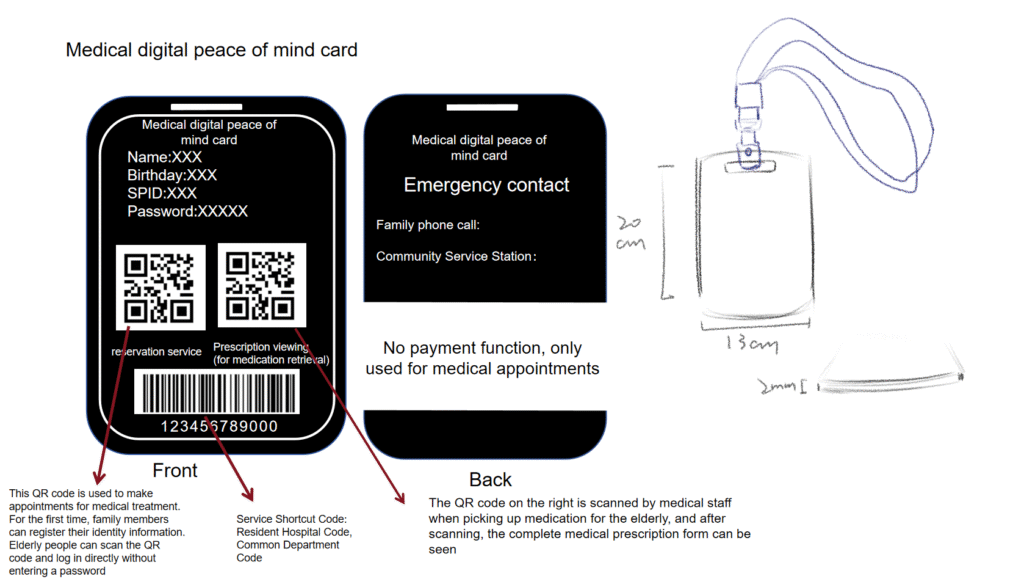
This’ Medical Digital Security Card Set ‘can help Italian elderly people solve medical problems from three aspects: appointment booking, medication collection, and emergency support:
- Convenient appointment for medical treatment: The appointment service QR code on the front of the card allows elderly people to complete their appointment directly by scanning the code after their family members enter their identity information for the first time without entering a password.
- Simplify the medication retrieval process: The prescription on the card can be viewed with a QR code. When elderly people retrieve medication, medical staff can scan the code to retrieve the complete prescription without the need to operate electronic devices independently.
- Emergency and Information Support: The back of the card contains emergency contact information (family phone number, community service station), as well as hospital and department shortcut codes, making it convenient for the elderly/staff to quickly associate medical information; And it has no payment function, only used in medical scenarios to reduce usage risks.
- The elderly person inserts the prescription information card, and the device voice prompts “The card has been read. If you need to make an appointment for medical treatment, please press the appointment button”.
- Press the [Appointment] button to voice inquire about the department, and the elderly will answer verbally. It supports recognizing Italian and dialects, and the device automatically matches the associated medical institutions to make appointments and broadcasts the available time slots.
3.After listening to the time slot, the elderly can press the 【 confirm 】 button to successfully make an appointment - The following is my simulated elderly usage process
- The usage process of grandparents can be described as follows (completely natural and in line with daily habits):
- Pick up the machine and insert the card: Grandpa picked up the square machine in his pocket/desktop, and directly inserted the commonly used prescription information card into the side card slot – the machine automatically turned on. At the same time, he said in slow Italian dialect, “The card is read, if you want to make an appointment for medical treatment, just press the appointment button.
- Trigger appointment: Grandma touches the protruding “appointment button” and presses it, and the machine immediately asks “Which department do you want to book? For example, cardiology or general practice?” Grandma directly answers “cardiology” verbally.
- Confirmation period: the machine announces “it can be about 10 a.m. next Tuesday and 3 p.m. next Thursday”, grandpa presses the “Confirm” button, the machine repeats “it has made an appointment for 10 a.m. Dim sum dirty department next Tuesday”, and automatically synchronizes to the community terminal at the same time.
- Seek help in case of difficulty: If grandma doesn’t hear the time slot clearly, press the red “help button” and immediately connect to the community’s customer service who speaks dialects. After a few words, ask clearly.

Hello Yixiao,
Would you be sketch the steps how the grandparents might used this concept?
This will help the Clients to better understand how a user would benefit from your design solution.
Thank you, Erik
PS. Can you please ask one of your classmates to update your name in your profile?
Thank you for your guidance, Professor. I have updated this post and will communicate with the client promptly if they have any further questions
Hi Team 8 it’ Ceren here from Team 11, very nice sketches and perspective I would say. Can not wait to see if you can add more details any information on your
design solution 🙂
Hello,Ceren Nice to meet you! Thank you for your compliment~
Great job guys! I think the task wasn’t so simple but you really did great!
Hi guys this is Chiara from team 24, I really like your ideas and I think you should all work together on a bracelet combining your different ideas into one, Good job!